A portal for MSSPs.
Our portal is meant for MSSPs handling multiple vulnerability management solutions with different customers. One single place to follow the vulnerabilities. Let's go straight to the point:
- 1000€/net/month - unlimited IPs
- One month trial period with 100% reimbursement
- No minimum contract term, cancel from one month to another.
Brings together data from
 Qualys
 Tenable
 Microsoft Defender
One place to rule them all
An MSSP runs the service, the CISO answers for the risk, and the IT engineer fixes the findings. Our portal shows each of them what they need first.
MSSP view
Perfect for VOC analysts and Service management
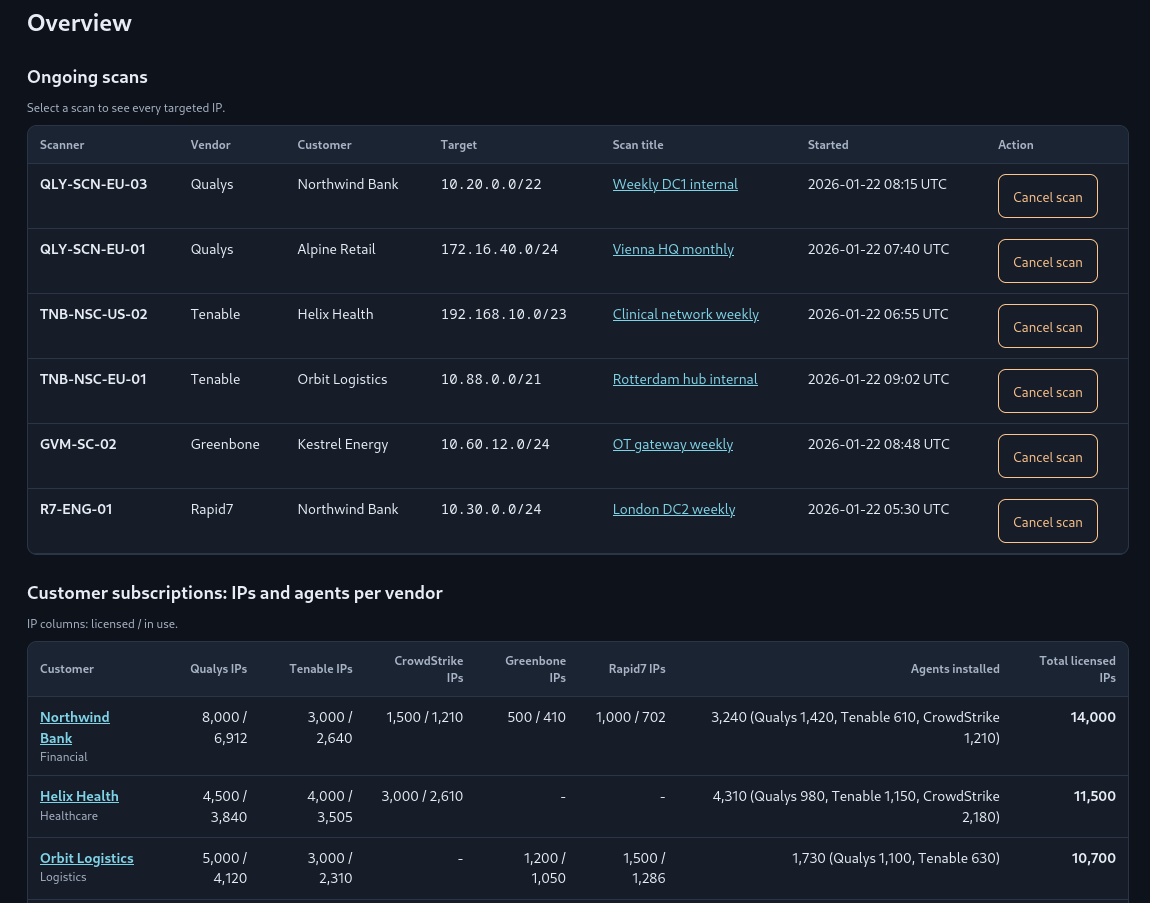
The bastion portal is a centralized view of current deployment:
- View ongoing scans, scan title, target IPs, scanner IP and the option to cancel the scan.
- View the license usage, how many IPs left, how many agents deployed, etc.
- Set up alerts when the number of IPs in a license is close to the limit.
- Centralized meeting notes and scan performance tracking per customer
- Search CVE or software presence accross all your customers to reduce the time to alert following 0-days
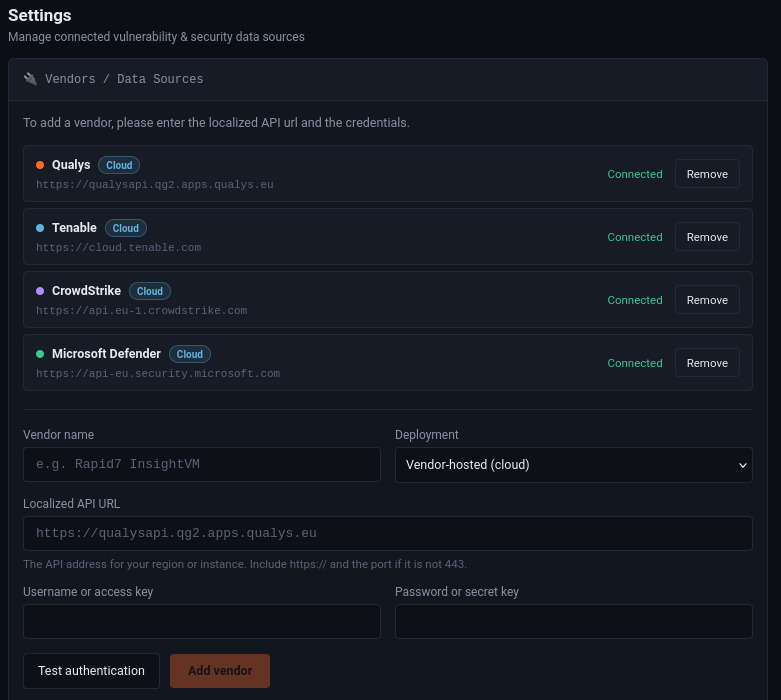
Very easy vendor integration per customer
Choose the vendor, enter the API URL and the API account details, and test the connection before you save it. The import panel then shows when each sync ran, how many hosts it saw and how many findings were new or updated.
Removing a vendor only affects new scans. Historical findings stay in place.

CISO view
Answer "are we getting safer?" with numbers
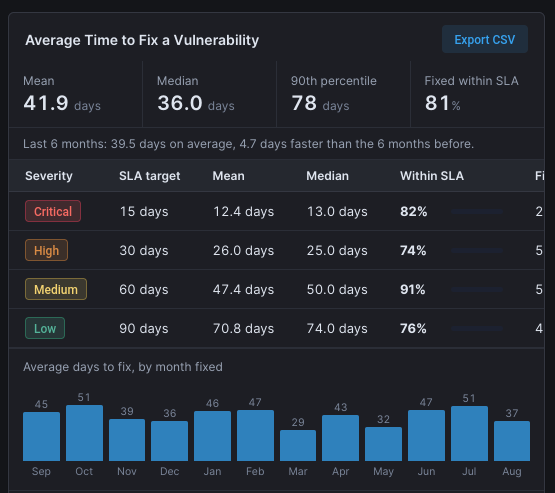
The CISO does not need a list of 1,750 findings. They need to know how many are critical, how many hosts are exposed and how fast the team closes them. Those figures are on their dedicated page, and they come from the same data the engineers work in. Easy to export findings for integration in reports or presentations.
- Counts of critical and high findings and of affected hosts.
- Average CVSS score and average EPSS probability, so severity is read next to the chance of exploitation.
- Average time to fix, split by severity and shown with its sample size, so a small sample is not mistaken for a trend.
- CSV export to carry the figures into a board report or an audit file.
IT engineer view
Easy vulnerability querying
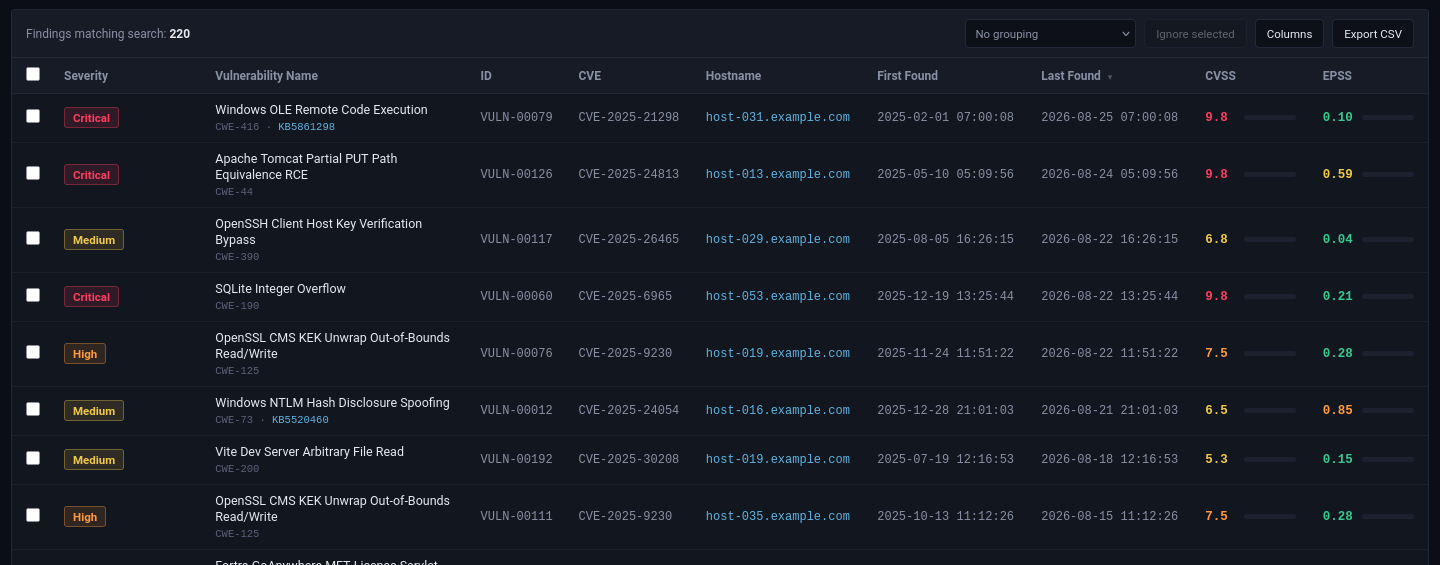
A centralized tool to query the data. Inspired by our own experience as vulnerability management analysts. Query anything.
- Query anything. Add time filters and save those queries for re-use.
- Group your findings to avoig too much scrolling.
- Split between locations, so you can address different environments
- Track tasks so you know what was done if you have to reproduce it for production
Vulnerability management, explained
Think of an IT environment as a garden. Weeds appear all the time, and a gardener who walks the beds every week keeps them small. Vulnerability management is that weekly walk, applied to servers, laptops, networks and applications.
For IT engineers
It means finding, judging and correcting security weaknesses in a network. Scanners and agents detect them, then teams apply patches or change configurations. The aim is hosts that are harder to attack.
For managers
It is a structured routine: regular assessments, remediation plans and trained teams. It lowers operational risk before an incident happens, and it produces the evidence that regulators and auditors ask for.
For the executive board
It protects customer trust and the company's reputation. Done well, it ties security work to business goals, and outsourcing it to specialists keeps the cost lower than hiring, training and buying tools alone.
What a managed service takes off your plate
- Setting up the detection tools
- Training on each of them
- Routine monitoring
- Sorting out false positives
- Prioritising what to fix first
- Suggesting how to remediate
- Reporting to decision makers
- Following each vulnerability until it is closed
Where our portal fits
The MSSP's analysts do this work for many customers, often with several vendors' tools. We collects what those tools report into one data set, so enrichment, prioritisation, tracking and reporting happen in one place instead of five.
See our portal with your own vendors
Tell us which scanners you run today and how many customers you serve. We will show you the three views with that setup.
Write to us and we will reply with a demo date.